Go Back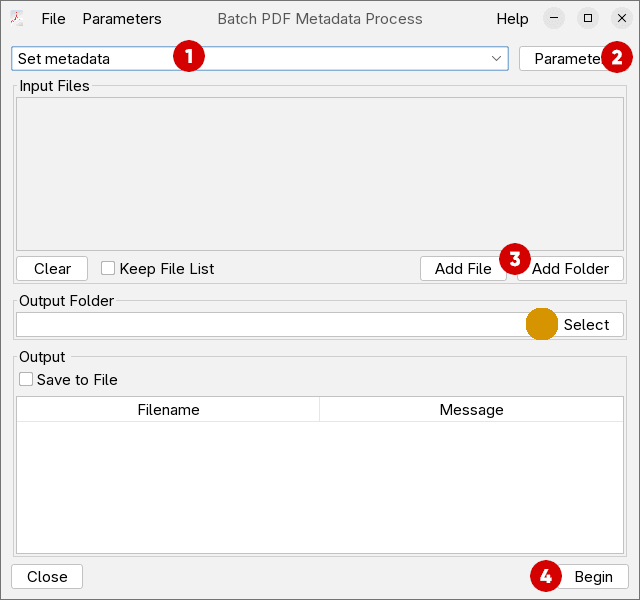
Batch Editor getting started
Change the Author on multiple files
Here is a step by step guide on how to change metadata fields on multiple files at once.
-
Select the Batch operation :
Set metadata -
Click on
Parametersbutton to open the parameter Configuration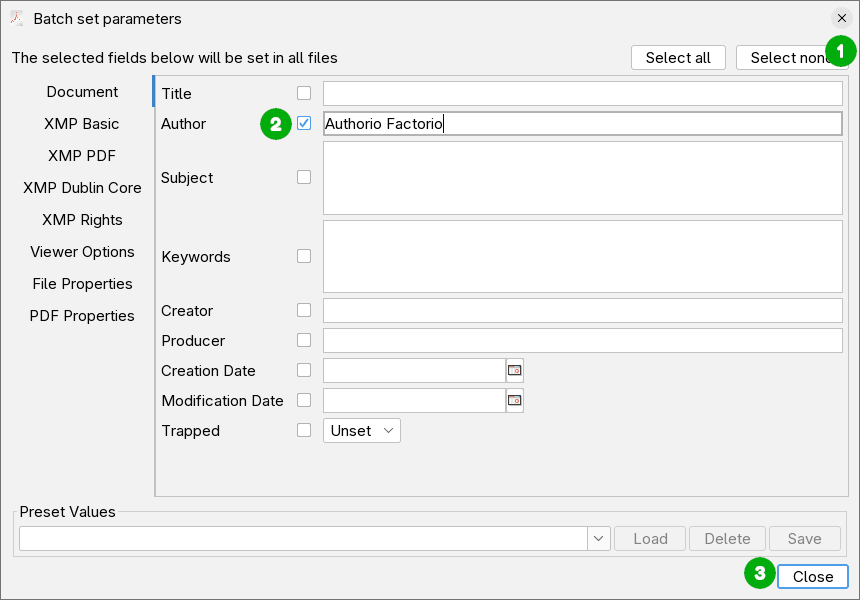
- Click
Select noneto deselect all fields - Enable the
Authorfield, by clicking the checkbox next to it. Enter the desired value for the Author field. - Click
Close
- Click
-
Add inputs files or folders to be processed. When adding a folder, every PDF in the folder will be processed.
-
Optionally add an output folder, and click
Begin.If you leave the output folder empty, the original PDF files will be overwritten. If you select output folder that is different from the input files folder, the input files will be left unchanged and the modified ones will be placed in the output folder.
For more details, on different function supported check the article on Batch Editor Interface